
Response Speed & Interview Type
Dusky gives you two main controls over how it answers: Response Speed (how fast and how long the answer is) and Interview Type (how the answer is formatted and how much of your context it uses), plus two language rows — Code Language and Answer Language. All four live in the More options menu (the ⋯ button on the toolbar) and are independent of each other.
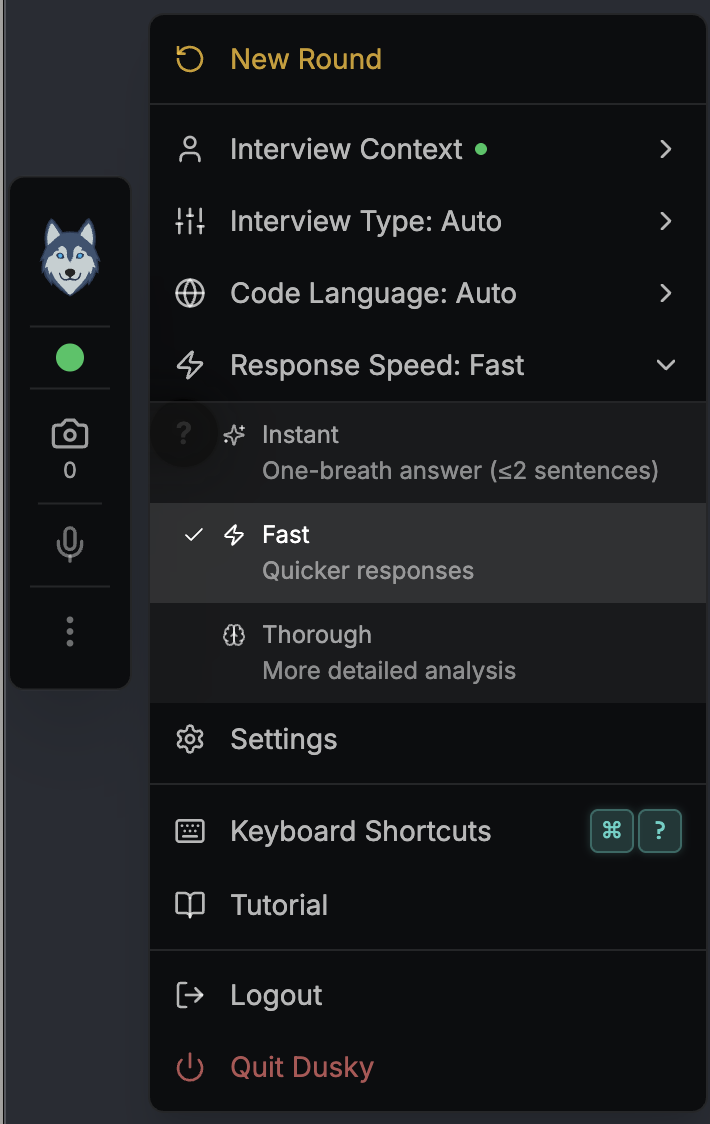
Response Speed
Section titled “Response Speed”Choose how quickly Dusky answers and how much detail it returns. The setting is remembered between sessions. The default is Fast.
| Speed | What you get | Best for |
|---|---|---|
| Instant | A one-breath answer of one to two sentences, with no headers or bullet points | The few seconds before you have to start speaking |
| Fast | A quick, focused answer (the default) | Most questions during a live interview |
| Thorough | A more detailed answer with fuller structure and reasoning | Complex problems where you have time to read |
Response Speed changes both how fast the answer arrives and how deep the underlying model reasons, so Instant is genuinely quicker to first word, not just shorter.
Interview Type
Section titled “Interview Type”Interview Type controls how answers are formatted and how much of your Interview Context (CV and job description) Dusky pulls in.
| Type | What it does |
|---|---|
| Auto | Adapts to your inputs and the question |
| Coding | Algorithm solutions with minimal context |
| Technical | System design, architecture, and technical Q&A |
| Behavioral | STAR-format answers that use your CV and job description |
Pick Behavioral for competency and “tell me about a time…” rounds, Coding for algorithm screens, and Auto if you want Dusky to decide.
Code Language
Section titled “Code Language”Code Language sets the programming language Dusky writes solutions in. Open the ⋯ menu and pick one: Auto plus Python, JavaScript, TypeScript, Java, C++, C#, Go, Rust, Kotlin, Swift, Ruby, PHP, Scala, and SQL. Auto lets Dusky infer the language from the question.
Answer Language
Section titled “Answer Language”Answer Language is a separate row in the ⋯ menu, and it does something different: it sets the natural language Dusky writes its answers in. There are 22 options, including Match question (the default), English, Español, Deutsch, Français, Italiano, Português, Nederlands, Svenska, Norsk, Dansk, Suomi, हिन्दी, Tiếng Việt, العربية, עברית, 日本語, 中文, Русский, 한국어, and اردو.
Match question is usually what you want — Dusky replies in whatever language the question came in.
How the controls work together
Section titled “How the controls work together”Response Speed and Interview Type are independent — for example, Behavioral + Instant gives you a one-to-two-sentence STAR answer, while Technical + Thorough gives you a full architecture walkthrough. Set both to match the round you are in.